
- This topic has 17 replies, 3 voices, and was last updated 5 years, 8 months ago by
 kabadabra.
-
AuthorPosts
-
-
June 5, 2016 at 9:47 am #6591
 kabadabraMember
I got three relationships I want to set on a custom post type, for example:
- __property_agent
- __property_tenant
- __property_owner
Using __property_tenant as an example, I am trying to get the relationship properties on the tenant page.
$related_properties = get_posts( array(
	'post_type'        => 'properties',
	'posts_per_page'   => - 1,
	'post_belongs'     => $post->ID,
	'post_status'      => 'publish',
	'suppress_filters' => false
));
What confuses me is I am not using the default __relate_post, so in the code above what do I put in to tell get_posts that my relationship variable is __property_tenant?
-
June 6, 2016 at 11:12 am #6594
 JasonKeymaster
Hi @kabadabra!
Please clarify: What do you means you’re “not using the default __relate_post”? Are you using the
relate => array( 'scope' => 'post' )in your field? If so the owned object should have that automatically, assuming the owner is a post.In any case, you don’t need to tell get_posts what the related post type is, so long as you specify the object type correctly (i.e. post, user, or comment). As far as the relationship itself is concerned, the post type doesn’t matter; the post type only matters when you’re initially establishing the relationship.
Hope this helps! 🙂
-
June 6, 2016 at 11:47 am #6596kabadabraMember
Hi Jason,
Here is the example of my three relationships
// Agents // Relational Field
piklist(
	'field', array(
		'type'  => 'select',
		'field' => '_' . piklist::$prefix . 'property_owner',
		'label' => 'Owner',
		'choices' => piklist(
			get_users(
				array(
					'role' => '' // Todo: Set to agent
				)
			),
			array('ID', 'display_name')
		),
		'relate' => array(
			'scope' => 'users'
		)
	)
);

// Tenants // Relational Field
piklist(
	'field', array(
		'type'  => 'select',
		'field' => '_' . piklist::$prefix . 'property_tenant',
		'label' => 'Tenant',
		'choices' => piklist(
			get_posts(
				array(
					'post_type'   => 'tenants',
					'numberposts' => -1,
					'meta_query'  => array(
						array(
							'key'     => '__tenant_landlord',
							'value'   => get_current_user_id(),
							'compare' => '=',
						),
					),
				)
			),
			array('ID', 'tenant_firstname')
		),
		'relate' => array(
			'scope' => 'tenants'
		)
	)
);

// Agents // Relational Field
piklist(
	'field', array(
		'type'  => 'select',
		'field' => '_' . piklist::$prefix . 'property_agent',
		'label' => 'Agent',
		'choices' => piklist(
			get_users(
				array(
					'role' => '' // Todo: Set to agent
				)
			),
			array('ID', 'display_name')
		),
		'relate' => array(
			'scope' => 'users'
		)
	)
);
When I try run the following code I don’t get any results:
$related_properties = get_posts( array(
	'post_type'        => 'properties', // Set post type you are relating to.
	'posts_per_page'   => - 1,
	'post_belongs'     => $postID,
	'post_status'      => 'publish',
	'suppress_filters' => false, // This must be set to false
));
So for now I’m pretty much running the following to get it working:
$related_properties = get_posts( array(
	'post_type'        => 'properties', // Set post type you are relating to.
	'posts_per_page'   => - 1,
	'post_status'      => 'publish',
	'suppress_filters' => true, // This must be set to false
	'meta_key'         => '__property_tenant',
	'meta_value'       => $postID
) );
Not sure if I’m doing something wrong or misunderstanding the relationship concept. Appreciate the assistance 🙂
-
June 6, 2016 at 11:57 am #6597JasonKeymaster
Ah, I see. In the property_tenant field, you have
'relate' => array( 'scope' => 'tenants'when it should be'relate' => array( 'scope' => 'post'. The scope is to specify the object type (i.e. post, user, comment), not the post type. 😉As you can see, whatever is used there is later used in the
__relate_{$relate}meta key. -
June 6, 2016 at 12:15 pm #6598kabadabraMember
Ahh ok cool, got it now, thanks!
So then instead of __property_owner for the ‘field’, I should be using something like __relate_tenants, __relate_properties etc? Or will this always still be __relate_post?
-
June 6, 2016 at 12:19 pm #6599JasonKeymaster
You actually don’t need a ‘field’ value at all for relate fields. The field is only used to provide a key for custom meta fields.
-
June 6, 2016 at 2:18 pm #6603kabadabraMember
Thanks Jason, really a big help! Will adjust my code and give it a try.
-
June 6, 2016 at 2:44 pm #6604JasonKeymaster
Glad to help! 🙂
-
June 7, 2016 at 12:24 pm #6623kabadabraMember
On the frontend form, the relation “saving” doesnt seem to work. I added a scope with post_meta as the value so that it gets saved. The relation however is not working. It only works when I save it from the backend. Is there anything special to add for relationships on a frontend form?
piklist( 'field', array( 'scope' => 'post_meta', 'type' => 'select', 'field' => '_' . piklist::$prefix . 'property_tenant', 'label' => 'Tenant', 'choices' => piklist( get_posts( array( 'post_type' => 'tenants', 'numberposts' => -1, 'meta_query' => array( array( 'key' => '__tenant_landlord', 'value' => get_current_user_id(), 'compare' => '=', ), ), ) ), array('ID', 'tenant_firstname') ), 'relate' => array( 'scope' => 'post' ) ) ); -
June 7, 2016 at 2:56 pm #6625JasonKeymaster
The difference between admin-side and front-end forms is that in the back-end the scope of the fields are derived from the context. For example if a field is on the post edit page, the fields assume they should save as the meta of that post. On the front end there’s no screen context, so it’s up to you to define both the scope and the object (if there is one).
Try setting
'scope' => 'post'. -
June 7, 2016 at 3:09 pm #6626kabadabraMember
Setting the scope to post didn’t work. It doesn’t save the field “__property_tenant” as meta. When set as post_meta, the meta saves at least but the relationship is unchanged and still uses the previous item that was set as the relation.
-
June 8, 2016 at 1:37 pm #6633
 SteveKeymaster
@kabadabra– On the admin side Piklist can figure out what is being saved since the environment is controlled. On the front end your forms can be anywhere. You need to pass Piklist more information on the front end. A good example is in the built-in demos:
piklist/add-ons/piklist-demos/parts/forms/new-post-with-validation.phpJust adding this to your form:
piklist('field', array( 'type' => 'hidden' ,'scope' => 'post' ,'field' => 'post_type' ,'value' => 'properties' ));-
June 8, 2016 at 1:52 pm #6635kabadabraMember
@Steve (and hi)
I already have the following at the top of my form:
// Where to save this form
piklist('field', array(
		'type' => 'hidden',
		'scope' => 'post',
		'field' => 'post_type',
		'value' => 'properties'
	)
);
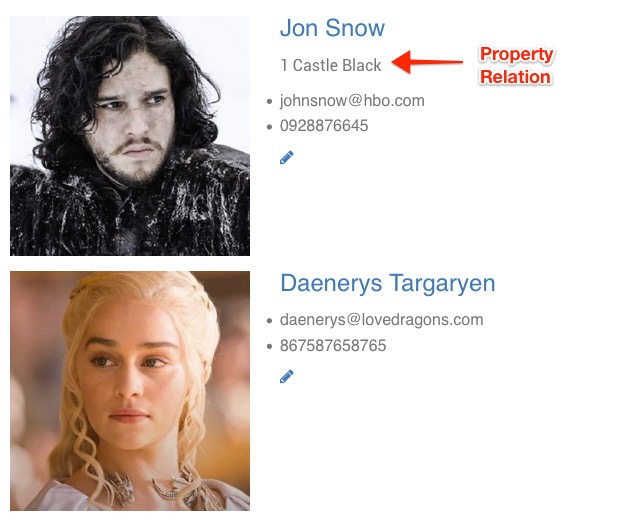
Here is an example of my property relation on a tenant. Current the tenant is set to Jon Snow for the 1 Castle Black property. See: https://dl.dropboxusercontent.com/s/g5ko68xmlovvpuu/2016-06-08%20at%2019.44.jpg
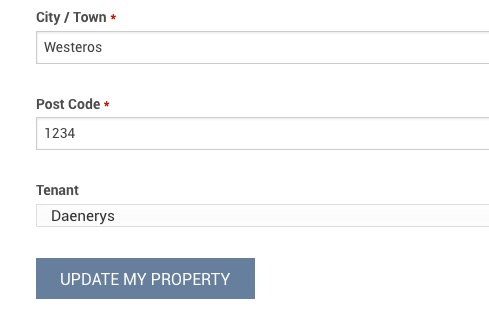
Now when I edit the property on the frontend, and I set the tenant to Daenerys, the relation still does not get updated. However it updates from the backend just fine, but as you say that’s because the admin environment knows how to deal with it. See: https://dl.dropboxusercontent.com/s/apx87aorwe57vc9/2016-06-08%20at%2019.46.jpg
If it helps, I attached the full form php file. I can’t get the relation to update from the frontend 🙁
<?php
/*
Title: Properties
Method: post
Message: Property Saved.
Logged in: true
*/

// Get page edit value
$getEdit = $_GET['_post'];
$postID = $getEdit['ID'];

// Where to save this form
piklist('field', array(
		'type' => 'hidden',
		'scope' => 'post',
		'field' => 'post_type',
		'value' => 'properties'
	)
);
// post_status
piklist(
	'field', array(
		'scope' => 'post',
		'type'  => 'hidden',
		'field' => 'post_status',
		'value' => 'publish'
	)
);
if($postID == '') {
	// Property Owner
	piklist(
		'field', array(
			'scope' => 'post_meta',
			'type'  => 'hidden',
			'field' => '__property_owner',
			'value' => get_current_user_id()
		)
	);
}

/*************************/

// Address 1
piklist( 'field', array(
	'type'       => 'text',
	'scope'      => 'post_meta',
	'field'      => 'property_address_1',
	'label'      => 'Address 1',
	'attributes' => array(
		'class' => 'regular-text'
	),
	'required'   => true
) );

// Address 2
piklist( 'field', array(
	'type'       => 'text',
	'scope'      => 'post_meta',
	'field'      => 'property_address_2',
	'label'      => 'Address 2',
	'attributes' => array(
		'class' => 'regular-text'
	),
	'required'   => false
) );

// City / Town
piklist( 'field', array(
	'type'       => 'text',
	'scope'      => 'post_meta',
	'field'      => 'property_city',
	'label'      => 'City / Town',
	'attributes' => array(
		'class' => 'regular-text'
	),
	'required'   => true
) );

// Postal Code
piklist( 'field', array(
	'type'       => 'text',
	'scope'      => 'post_meta',
	'field'      => 'property_postcode',
	'label'      => 'Post Code',
	'attributes' => array(
		'class' => 'regular-text'
	),
	'required'   => true
) );

// Tenants // Relational Field
if ( is_admin() ) {
	$meta_query = array(
		'post_type'   => 'tenants',
		'numberposts' => - 1
	);
} else {
	$meta_query = array(
		'post_type'   => 'tenants',
		'numberposts' => - 1,
		'meta_query'  => array(
			array(
				'key'     => '__tenant_landlord',
				'value'   => get_current_user_id(),
				'compare' => '=',
			),
		),
	);
}
piklist(
	'field', array(
		'scope'   => 'post_meta',
		'type'    => 'select',
		'field'   => '_' . piklist::$prefix . 'property_tenant',
		'label'   => 'Tenant',
		'choices' => piklist(
			get_posts(
				$meta_query
			),
			array( 'ID', 'tenant_firstname' )
		),
		'relate'  => array(
			'scope' => 'post'
		)
	)
);

/*************************/

// Submit
if($postID == '') {
	$submit_label = 'Create My Property';
} else {
	$submit_label = 'Update My Property';
}

piklist(
	'field', array(
		'type'  => 'submit',
		'field' => 'submit',
		'value' => $submit_label,
		'attributes' => array(
			'class' => 'submit-button',
			//'disabled' => 'disabled'
		)
	)
);
-
-
June 8, 2016 at 1:40 pm #6634JasonKeymaster
Also, keep in mind that you don’t need the
'field'parameter to the field if you’re using it for relationships. -
June 8, 2016 at 2:10 pm #6636SteveKeymaster
@kabadabra– I know EDITING does not work, does ADDING it new work?
-
June 8, 2016 at 2:30 pm #6637kabadabraMember
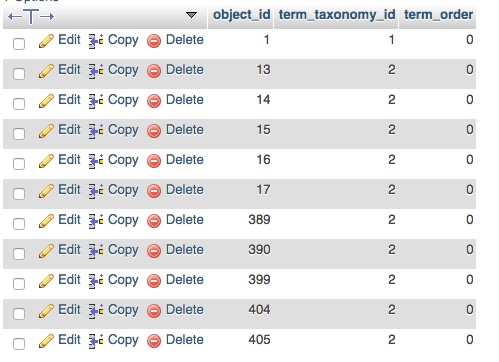
@Steve – Tried a few tests now and also doesnt work. Latest post created from frontend = ID 410, but not ID gets added to the table – https://dl.dropboxusercontent.com/s/dgvvnkyw872l1v1/2016-06-08%20at%2020.28.jpg
So creating from frontend the relationships are also not working.
-
-
June 9, 2016 at 1:05 pm #6645SteveKeymaster
@kabadabra– Looks like there may be a bug here with relationships and front-end forms. We’ll look into it, but it may be a few weeks.
-
June 10, 2016 at 2:45 am #6663kabadabraMember
@Steve – Ahh ok thank you, for now ill use the meta field to do queries against to get the relationships. Keep up the good work, piklist is awesome! 🙂
-
-
AuthorPosts
- You must be logged in to reply to this topic.